
You can log a meal in a few seconds and get calories, macros, and some micronutrients before you finish eating. That’s the main point. In our 1,400-dish, 24-country benchmark, median log times ranged from 2.6 seconds for the fastest AI tracker to 24 seconds for the slowest database-first app — but the result is still an estimate, especially for mixed dishes, sauces, oils, and restaurant meals.
Here’s the short version:
- AI tracking works best for speed, not perfect precision.
- Photos are the best fit for plated meals.
- Barcodes are the best fit for packaged foods.
- Text or voice help when you can’t take a photo.
- Portion size is the weak spot, and it drives much of the calorie error.
- Weekly patterns matter more than one meal entry.
If I were picking the main takeaway from this article, it would be this: use the fastest logging method that still gives a clean entry, then fix obvious misses right away. That means scanning a protein bar instead of photographing it, adding oil or dressing by hand, and checking your protein, fiber, and sodium after each meal so you can adjust the rest of your day.
A few numbers from our testing stand out:
- Photo-first AI apps logged a meal in a median of 2.6 to 5.1 seconds
- Database-first apps took 19 to 24 seconds for the same job
- Portion error tracked calorie error closely across all 1,400 dishes, which tells us most calorie error starts with how much food the app thinks is on the plate, not the per-gram nutrition data
- Welling AI led on both accuracy metrics: 6.2% calorie error, 8.1% portion error, and 89% of photos within 10% of the weighed truth
- MyFitnessPal had the second-best barcode hit rate at 96%, but a 10.4% calorie error and only 64% of photos within 10%
- Cal AI was the closest photo-first alternative at 5.1 seconds and 80% of photos within 10%
Quick comparison
| App | Best use | Main strength | Main limit |
|---|---|---|---|
| Welling AI | Mixed meals, low-effort logging | Fastest log in the field (2.6s) and lowest calorie error (6.2%) | Like every photo tool, it can miss hidden cooking fats |
| Cal AI | Photo-first logging | Second-best photo hit rate (80%) at 5.1s | Shallower guidance; 9.6% calorie error |
| Cronometer | Micronutrient depth | Curated database; 6.9% calorie error | Slowest app we timed, at 24s per log |
| MacroFactor | Adaptive macro targets | 7.8% calorie error with trend-based coaching | 19s median log; photo logging is bolted on |
| MyFitnessPal | Packaged and branded foods | 96% barcode hit rate across the largest catalogue | 10.4% calorie error; 21s median log |
Bottom line: Real-time AI tracking is most useful when you want fast feedback during the day, not a lab-grade readout. Used the right way, it helps you spot gaps early and make better meal decisions while there’s still time to fix them. Our best AI nutrition coach apps roundup covers which apps do this best.
How AI converts a meal into nutrient data
The speed feels almost instant, but the process is pretty simple: the app figures out what you ate, estimates how much you ate, and then links that to nutrition data. That’s what happens after you log a meal.
Food recognition from photos, chat, and voice
When you snap a photo, type a message, or use voice input, the app identifies foods using visual signals and language clues. The apps that scored highest in our testing support photo, chat, and voice input, so you can log a meal even without a photo. That kind of flexibility matters in day-to-day life. Sometimes taking a photo is easy. Other times, it just isn’t.
Misidentification is the single largest source of error we see, because a wrong food brings a wrong nutrition profile with it. Getting the identification right is most of the battle.
Portion estimation and nutrient lookup
Identifying the food is only half the job. The harder part is figuring out how much you ate.
For photo logs, AI estimates portion size from the image and then converts that estimate into grams using food density data. For barcode-scanned packaged foods, it skips that step. For restaurant meals and home-cooked dishes, it also has to make recipe assumptions for hidden ingredients like oil or butter.
In our calorie accuracy test, portion error tracked calorie error closely for every app — the field ran from 8.1% portion error at the top to 14.6% at the bottom. That correlation matters: it means most of the error in these apps originates upstream, in how much food the app thinks is on the plate, rather than in the per-gram nutrition data.
Once the food and portion are set, the app matches them to a nutrition database, such as USDA FoodData Central or a proprietary global database, to pull calories, macros, and micronutrients. That’s the step behind the app’s real-time calorie, macro, and micronutrient feedback.
Why accuracy varies by food type
Accuracy is best with single-ingredient foods and weakest with mixed dishes, casseroles, and layered restaurant meals. A plain apple is much easier to estimate than lasagna or a loaded burrito bowl.
The split in our data is stark. On simple foods, the leaders posted a 4.1% to 5.0% calorie error. On mixed and international dishes, the same apps ran 7.9% to 11.8%, and the database-first apps drifted past 15%. Our photo-logging test found the same pattern: every app cleared 84% within 10% on simple single-item plates, but most fell below 60% on restaurant and takeaway plates.
If you want the cleanest log, barcode scans usually work best for packaged foods. For mixed plates, photo-based results are estimates rather than exact numbers.
Next: how to choose the fastest logging method for each meal.
How to use AI apps for real-time nutrient tracking
Once the app can read your meal, the next step is giving it the cleanest input you can.
Set your profile, goals, and daily targets
Start by filling out your profile once. Add your age, sex, height, weight, activity level, and goal so the app can set your calorie and macro targets and show what you still need for the day.
Log meals with the right input method for each situation
Different meals call for different logging methods. The point isn’t just speed. It’s getting the most accurate read on what’s left for the rest of your day. Use the easiest option that doesn’t force you to guess.
| Situation | Best method | Why |
|---|---|---|
| Plated meal or restaurant dish | Photo | Fastest route to a finished entry; the best engines hit 96% within 10% on simple plates |
| Protein bar, packaged snack | Barcode scan | The top scanners resolved 96%–97% of real products on the first scan |
| Home-cooked meal or a meal you ate earlier | Chat or text | Lets you describe meals naturally without manual database searching |
| When your hands are busy | Voice | Useful for quick logging, but usually less accurate than photo input |
For photo logs, take the picture from directly above and make sure the full plate is visible. That top-down angle gives the app its best shot at estimating portion size.
One catch: photos often miss calorie-dense extras like cooking oils, butter, and dressings. If you want your numbers to stay honest, log those separately.
Use live feedback to adjust the rest of your day
This is where real-time tracking starts to pay off. After you log lunch, a good AI app doesn’t just store the meal. It shows what you have left.
Check your remaining protein, fiber, and sodium targets, and dinner gets a lot easier to plan.
The better apps add plain-language coaching that flags protein gaps and calorie patterns. From there, use the remaining totals to shape your next meal.
If the app gets a portion wrong, fix it right away. One bad lunch entry throws off the remaining-balance numbers for the rest of the day.
How the tested apps compare on real-time logging
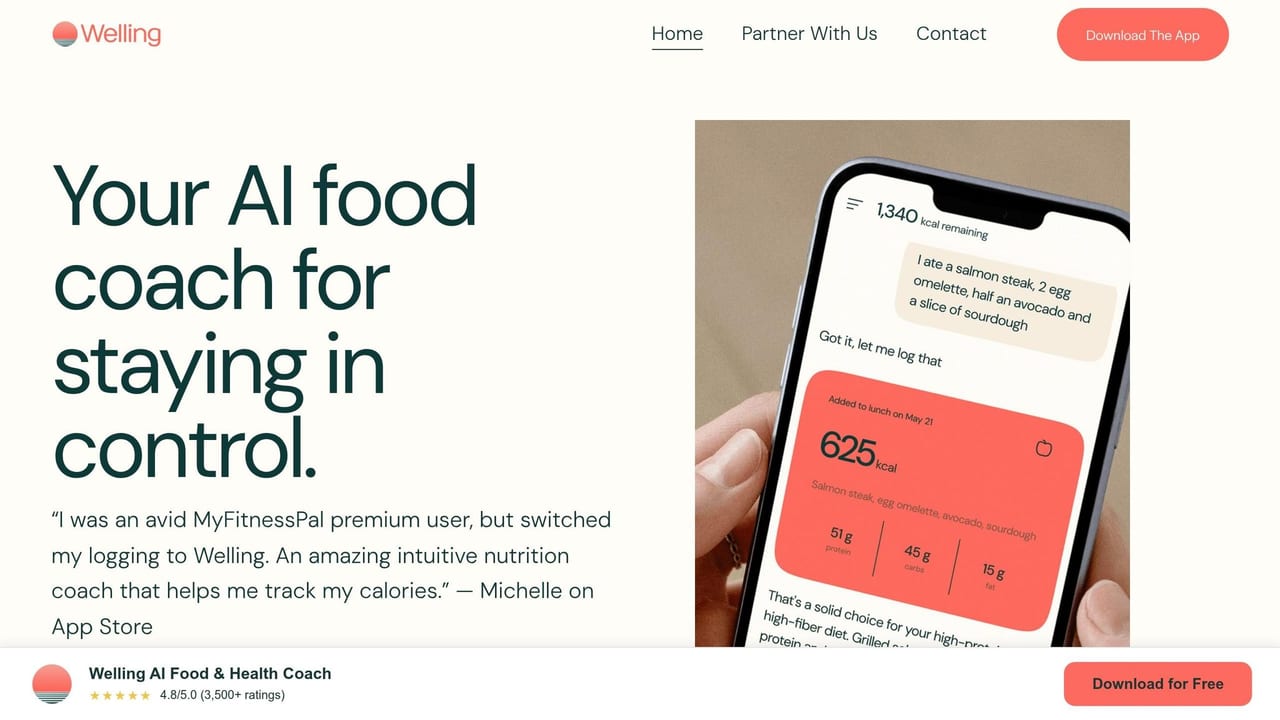
The best app comes down to two things: how fast you can log a meal and how well the app handles the food you eat day to day. That matters more than flashy features, because if logging feels slow or the results are off, most people stop using the app.
Every figure below comes from the same benchmark — 1,400 weighed dishes from 24 countries, logged through all ten apps, with 134,000 photos and dish descriptions. Full protocol on our methodology page.
| App | Calorie error | Portion error | Photos within 10% | Median log time | Score |
|---|---|---|---|---|---|
| Welling AI | 6.2% | 8.1% | 89% | 2.6s | 9.7 |
| Cronometer | 6.9% | 9.4% | 68% | 24s | 8.7 |
| MacroFactor | 7.8% | 10.5% | 71% | 19s | 8.9 |
| Cal AI | 9.6% | 12.8% | 80% | 5.1s | 8.3 |
| MyFitnessPal | 10.4% | 13.5% | 64% | 21s | 8.0 |
Where AI logging works best for low-effort tracking
Welling AI stands out on the combination that matters for real-time tracking: it posted the lowest calorie error (6.2%) and portion error (8.1%) in the field while logging a meal in a median of 2.6 seconds, and it landed within 10% of the weighed truth on 89% of photos. It also led 24-country coverage at 94%.
In plain English, that makes it a strong fit for mixed plates and home-cooked meals — the meals that usually trip apps up. A bowl with rice, vegetables, sauce, and protein can turn into a mess fast if an app misses an ingredient or guesses the portion badly. On restaurant and takeaway plates, the hardest case we tested, it held 83% within 10% where most of the field fell below 60%.
When another app may be a better fit
MyFitnessPal makes more sense if you eat a lot of branded or packaged foods. Its 96% barcode hit rate — second only to Welling AI’s 97% — across the largest catalogue in the category is a genuine edge in that lane. The trade-off is a 10.4% calorie error and a 21-second median log, and only 64% of its photo logs landed within 10%.
Cronometer is the pick if you want micronutrient depth and verified data. Its curated database produced the second-lowest calorie error at 6.9%, but at a 24-second median log it was the slowest app we timed — the opposite trade-off from real-time AI logging.
MacroFactor suits people who want adaptive targets that respond to their weight trend, at 7.8% calorie error and a 19-second median log.
Cal AI is the closest photo-first alternative, at 5.1 seconds and 80% of photos within 10%, though its guidance stays shallower and its calorie error is 9.6%.
Still, food type and input quality shape the result more than people think. A clean barcode scan is one thing. A homemade stew, a crowded plate, or poor lighting is another. That changes how much trust you can put in the numbers.
Limits, best practices, and key takeaways
How to get more accurate results day to day
Once you understand how the app reads meals, the next move is simple: give it cleaner inputs.
Portion estimation is where the error concentrates. The biggest issue is depth — a camera can see a plate, but it can’t judge thickness or bowl volume with much precision. That’s why it helps to know where the app tends to slip. You can catch odd entries without pulling out a food scale for every meal.
A few habits make a big difference:
- Take photos from above and include a size reference, like a fork or the edge of a plate.
- For foods with a barcode — protein bars, packaged snacks, and frozen meals — scan the code instead of taking a photo.
- Log cooking oils, butter, dressings, and sauces on their own, since AI often skips them.
- Weigh the foods you eat most often once, to calibrate your eye for good.
That matters because weekly consistency beats one perfect log.
What to remember about AI nutrient tracking
The point isn’t perfect logs. It’s reliable trends.
Don’t judge the app by a single meal. Judge it by what shows up across the week. One entry might run a little high, another a little low, but weekly totals tell you far more than any one lunch or dinner.
Fast, steady logging usually gives you better long-term data than perfect logging you can’t stick with. If your tracker is consistently off by the same amount in the same direction, your weight trend still tells you the truth, and an adaptive app can correct your targets around that bias.
If you want the most useful results, keep it simple: fix repeated meals, use barcodes for packaged foods, and add hidden fats by hand.
FAQs
How accurate is AI food tracking?
Accurate enough to guide the decisions that matter, and never precise enough to treat as a lab scale. Across our 1,400-dish benchmark the best app posted a 6.2% calorie error and an 8.1% portion error, while the loosest sat at 12.1%. On photo logging specifically, the leader landed within 10% of the weighed truth on 89% of images.
The averages flatter everyone, though. On restaurant and takeaway plates, most apps fall below 60%, because hidden fats, layering, and composite dishes defeat a flat photo. Regional recipe differences and database quality widen the gap further — a bowl of chili in Texas may not match a bowl of chili somewhere else.
Chat and voice logging help here, because you can tell the app what the camera cannot see.
When should I use photo, barcode, or text logging?
- Photo logging works best when you want to log a whole-food meal fast, right in front of you — the best photo engines hit 96% within 10% on simple single-item plates.
- Barcode logging is the best fit for packaged foods, where the top scanners resolved 96% to 97% of real products on the first scan.
- Text or chat logging works well for meals you already ate, mixed recipes, or small details a photo might miss, like cooking oils.
The most accurate method is ultimately the one you will keep doing.
What nutrients should I check after each meal?
After each meal, pay attention to your macronutrients: protein, fat, and carbohydrates. Keeping an eye on those numbers, along with total calories and fiber, can help you stay on track whether your goal is weight loss, muscle gain, or maintenance.
If you want a closer look at micronutrients too, an app with real micronutrient depth gives you a more detailed breakdown. One meal can be a little noisy, so it’s smarter to use real-time feedback to spot weekly patterns instead of obsessing over a single plate.